Dropped by the nice large middle-school field to do some flying. Multiple playing fields where already in use. A little too busy for my tastes, so went to smaller Rec-Center field instead.
79F and Overcast skies - Was still getting SATs 10-14 and HDOP 1.6-1.3 (after a short minute or so) even with the heavily cloudy skies.
Winds 15mph - A little windy, but if I wait for sunny day with lite winds (optimal flying conditions) I might be waiting forever. Quads flew fine and it was good (challenging) practice for me. I could tell quads were applying more effort, fighting to hold a Loiter. On Alt-Hold, quads tended to drift a bit more (so I had to compensate).
I haven't flown at this field in a while. On initially loading Tower (DroidPlanner-3) the terrain maps were completely blank. I used the WiFi HotSpot feature on my iPhone to download the latest terrain maps (it only took a minute or so).
I flew both Novas ... emptied 3 batteries. Tested all Flight Modes. Flying low and fast in Alt-Hold is my favorite. Also, set to Loiter at 15meters and flew pretty far away ... down heavily-treed green-belt (really just using Tower's display-screen for actual location and directional orientation). Practiced manual landings in Stabilize, but also Land-Mode and RTL. Retracts are turning out to be much cooler than I originally thought they would be.
Several groups of neighbors stopped to watch. One boy liked the show and as I landed, yelled "That was awesome" before running off to join his friend.
Good session and nice to get in some flights.
Saturday, April 9, 2016

Monday, March 28, 2016
ArduPilot and ArduCopter - Changes and a new Chapter

Those of you who have been following the developments over the years know that ArduPilot has enjoyed a very close relationship with 3DRobotics for a long time, including a lot of direct funding of ArduPilot developers by 3DR. As 3DR changes its focus that relationship has changed, and the relationship now is not one of financial support for developers but instead 3DR will be one of many companies contributing to open source development both in ArduPilot and the wider DroneCode community. Read More.
Also, you can read about website changes.
Meanwhile ...
I had a few minutes the other day, so I took the quadcopters to the field and ran-through 3 batteries. Just casual flying and no crashes or anything. I hope to get the gimbal and camera back on one of them soon.
Monday, March 21, 2016
Internet Explorer 11 (IE11) and Enhanced Protected Mode, 64-bit, and Security in Windows
Now-days, a working Internet browser is vital. A while back, (while still running Windows-7/64bit) I got tired of my IE-11 occasionally locking-up, crashing and other strange things. This seemed to happen on websites with minor errors in code, long-running scripts, or even malicious ad-code that snuck into legitimate websites via their subscribed ad-network. I also wanted the maximum protection against security exploits. I turned on Enhanced Protected Mode (EPM) and IE11 was like a new browser. I like Add-Ons as much as the next user, but most are 32-bit and I value dependability and security more (only Add-Ons that are 64-bit compatible will run in Protected Mode).
Windows-7: IE-11/Internet Options/Advanced tab/Security section/
Enable Enhanced Protected Mode
Close everything and reboot computer.
Windows-8.1: IE-11/Internet Options/Advanced tab/Security section/
Enable Enhanced Protected Mode
Enable 64-bit processes for Enhanced Protected Mode
Close everything and reboot computer.
Windows-10: IE-11/Internet Options/Advanced tab/Security section/
Enable Enhanced Protected Mode
Enable 64-bit processes for Enhanced Protected Mode
Close everything and reboot computer.
 So while IE-11 can use Enhanced Protected Mode in Windows-7 (64bit), it's not as secure as the same browser (with similar settings in a newer OS) due to a limitation in the Operating System itself. It's better than nothing, but only Windows-8.1 and 10 support AppContainers and 64-bit browser-Tabs. AppContainers are an isolated memory space (Sandbox if you will) that the rest of the OS is protected from. Like you, I liked Windows-7 too (Windows-8, not so much), but this is just one reason why newer versions of Windows are better.
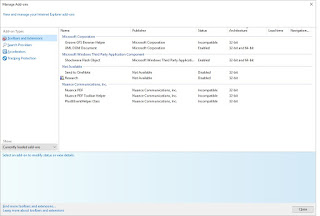
Here are my Add-Ons in Win-10/IE-11 after visiting a few websites and using Outlook.com and Word Online. Notice which are "32bit and 64bit Architecture" (allows them to be enabled in EPM), and which are actually Enabled. You can show "Currently loaded Add-ons" but there are others that load as needed (some without additional permission because they are from a trusted Publisher).
Now that I have upgraded to Windows-10, I will use IE-11 with the settings above. And while you should probably just skip websites that warrant it, "InPrivate Browsing" is there in Safety options if you need it. It's easy to switch your default browser away from Edge in Windows-10.

Using Edge is another option and might also be better for less technically-inclined or casual computer users. I'm trying to use it more myself. Looks like Enterprise Mode might be a way to ease the transition. Remember that there is also a "Open with Internet Explorer" menu-option in Edge (if you come across a legitimate website that is not working properly in Edge). Like it or not, the new Microsoft Edge browser is the future since Microsoft has ceased development on Internet Explorer (Edge is their new browser ... they had to start over). I still have Google Chrome installed as (rarely used) tertiary browser. Who has time for computer problems ... we have some flying to do.
More References:
http://www.eightforums.com/tutorials/31977-internet-explorer-enhanced-protected-mode-turn-off.html
http://stackoverflow.com/questions/19029208/how-does-internet-explorer-11-differ-between-windows-7-and-windows-8-1
... or just Google it :)
Windows-7: IE-11/Internet Options/Advanced tab/Security section/
Enable Enhanced Protected Mode
Close everything and reboot computer.
Windows-8.1: IE-11/Internet Options/Advanced tab/Security section/
Enable Enhanced Protected Mode
Enable 64-bit processes for Enhanced Protected Mode
Close everything and reboot computer.
Windows-10: IE-11/Internet Options/Advanced tab/Security section/
Enable Enhanced Protected Mode
Enable 64-bit processes for Enhanced Protected Mode
Close everything and reboot computer.

Here are my Add-Ons in Win-10/IE-11 after visiting a few websites and using Outlook.com and Word Online. Notice which are "32bit and 64bit Architecture" (allows them to be enabled in EPM), and which are actually Enabled. You can show "Currently loaded Add-ons" but there are others that load as needed (some without additional permission because they are from a trusted Publisher).

Now that I have upgraded to Windows-10, I will use IE-11 with the settings above. And while you should probably just skip websites that warrant it, "InPrivate Browsing" is there in Safety options if you need it. It's easy to switch your default browser away from Edge in Windows-10.

Using Edge is another option and might also be better for less technically-inclined or casual computer users. I'm trying to use it more myself. Looks like Enterprise Mode might be a way to ease the transition. Remember that there is also a "Open with Internet Explorer" menu-option in Edge (if you come across a legitimate website that is not working properly in Edge). Like it or not, the new Microsoft Edge browser is the future since Microsoft has ceased development on Internet Explorer (Edge is their new browser ... they had to start over). I still have Google Chrome installed as (rarely used) tertiary browser. Who has time for computer problems ... we have some flying to do.
More References:
http://www.eightforums.com/tutorials/31977-internet-explorer-enhanced-protected-mode-turn-off.html
http://stackoverflow.com/questions/19029208/how-does-internet-explorer-11-differ-between-windows-7-and-windows-8-1
... or just Google it :)
Tuesday, February 23, 2016
Quanum Nova & Cheerson CX-20 (Open Source APM-FC version) - Tech Addendum
As you know, most of my posts here are about my experiences with my Quanum Novas (a clone of the Cheerson CX-20 with the same Open-Source APM Flight Controller). Please search this blog (top left) if you are looking for something specific. This post will hold summaries and misc info that hasn't been posted before about this quadcopter. It will likely be added/edited frequently.
Verified as Working Custom Firmwares:
These are verified by me to work. I think pilots should be reminded that even if a posted archive is described as being some ArduCopter version, don't assume all posted custom-hex firmwares on the Internet are the same (chances are 99% they are not ... due to custom code changes and compiler settings).
v3.1.5 - VinnieRC's Custom ArduCopter v3.1.5
- http://www.rcgroups.com/forums/showpost.php?p=31678509&postcount=24678
ArduCopter.3.1.5-quad-apm2-CX20.zip
(Original posted archive holding ArduCopter.3.1.5-quad-apm2-CX20.hex)
MD5 Checksum: A24C2871AE252108E5B24D9BC438D2A8
SHA-1 Checksum: 568BC233BAFDD94CB903D2ED166B8379CB88589A
Generated by MD5 & SHA-1 Checksum Utility
http://raylin.wordpress.com/downloads/md5-sha-1-checksum-utility
ArduCopter.3.1.5-quad-apm2-CX20.hex
MD5 Checksum: 9C124499E57906CC6F4FF4060290B66F
SHA-1 Checksum: 143EEC489C451832F33C75D6EBA7CAE3F5A60B71
Generated by MD5 & SHA-1 Checksum Utility
http://raylin.wordpress.com/downloads/md5-sha-1-checksum-utility
This specific v3.1.5 works fine (including data-flash memory and logging feature) on two different versions of Cheerson installed APM-FC (in my Quanum Novas). Since my quads are working, I haven't found a need to look at the actual source-code. However, if the source-code was different (from any other posted archive) it would not pass MD5/SHA-1 verification.
APM_252_v2.0
- http://quadcopter-robotics.blogspot.com/2015/05/upgrading-firmware-to-315-cheerson.html
APM_252_v5.0
- http://quadcopter-robotics.blogspot.com/2015/09/new-nova-modding-for-flight.html
v3.2 - v3.2.1 - If I ever eventually get around to doing something with 3.2 or 3.2.1 , I will post it here also. If I do run v3.2.x, I will likely pro-actively reduce the logging to help ease the demands on this little APM-252 ... to prevent it from becoming over-burdened by the more complex code (as compared to v3.1.5). See above links for a couple of 3.1.5 setup-guide posts.
-------------------------------------------------------------------------------
Looks like either Cheerson or GlobalFly actually designed this little APM_v2.52 FC and shared it with the other. Here is a manual that GlobalFly released. (Thanks to RobotShop_com and DKEmxr for finding it).
-------------------------------------------------------------------------------
I've never owned a the RTF version (with the stock white radio gear pre-installed) but these pics might be helpful to some pilots. Thanks to PietPech.


Verified as Working Custom Firmwares:
These are verified by me to work. I think pilots should be reminded that even if a posted archive is described as being some ArduCopter version, don't assume all posted custom-hex firmwares on the Internet are the same (chances are 99% they are not ... due to custom code changes and compiler settings).
v3.1.5 - VinnieRC's Custom ArduCopter v3.1.5
- http://www.rcgroups.com/forums/showpost.php?p=31678509&postcount=24678
ArduCopter.3.1.5-quad-apm2-CX20.zip
(Original posted archive holding ArduCopter.3.1.5-quad-apm2-CX20.hex)
MD5 Checksum: A24C2871AE252108E5B24D9BC438D2A8
SHA-1 Checksum: 568BC233BAFDD94CB903D2ED166B8379CB88589A
Generated by MD5 & SHA-1 Checksum Utility
http://raylin.wordpress.com/downloads/md5-sha-1-checksum-utility
ArduCopter.3.1.5-quad-apm2-CX20.hex
MD5 Checksum: 9C124499E57906CC6F4FF4060290B66F
SHA-1 Checksum: 143EEC489C451832F33C75D6EBA7CAE3F5A60B71
Generated by MD5 & SHA-1 Checksum Utility
http://raylin.wordpress.com/downloads/md5-sha-1-checksum-utility
This specific v3.1.5 works fine (including data-flash memory and logging feature) on two different versions of Cheerson installed APM-FC (in my Quanum Novas). Since my quads are working, I haven't found a need to look at the actual source-code. However, if the source-code was different (from any other posted archive) it would not pass MD5/SHA-1 verification.
APM_252_v2.0
- http://quadcopter-robotics.blogspot.com/2015/05/upgrading-firmware-to-315-cheerson.html
APM_252_v5.0
- http://quadcopter-robotics.blogspot.com/2015/09/new-nova-modding-for-flight.html
v3.2 - v3.2.1 - If I ever eventually get around to doing something with 3.2 or 3.2.1 , I will post it here also. If I do run v3.2.x, I will likely pro-actively reduce the logging to help ease the demands on this little APM-252 ... to prevent it from becoming over-burdened by the more complex code (as compared to v3.1.5). See above links for a couple of 3.1.5 setup-guide posts.
-------------------------------------------------------------------------------
Looks like either Cheerson or GlobalFly actually designed this little APM_v2.52 FC and shared it with the other. Here is a manual that GlobalFly released. (Thanks to RobotShop_com and DKEmxr for finding it).
-------------------------------------------------------------------------------
I've never owned a the RTF version (with the stock white radio gear pre-installed) but these pics might be helpful to some pilots. Thanks to PietPech.

This next pic applies to all models (including PnF)

Another drawing of stock radio connection.

Finally, a pilot's pic from the forum.

Saturday, February 13, 2016
Flight Session 41 - SuperNova Flight-02
Took my second Nova to school-field for it's second set of flights. Mild winter here and today was nice at 69f. Clear with light winds at 12mph. Was getting good sats and dhop =< 1.6 . This time, I remembered to view and cache-in flying field on Tower/DP3 tablet at home WiFi before leaving.
I've been wanting to get out and fly, but with the holidays and family stuff, this is my first flight since before Thanksgiving. Ran 2 batteries through my new Super-Nova. A little windy but Super-Nova handled it fine. Tested all modes, flew around fast, and practiced manual landings. Still auto-land's itself perfectly also.
I tried out a new 3000mah lipo battery and it works fine. I got about 13 minutes (fairly hard/fast flying) on a stock Nova (no camera or gimbal).
My recent lack of stick-time shows. I was flying fast Alt-Hold at about 20meters and I let it get too far away from me to see its orientation. I was also over some tall trees at edge of field. I sorta panicked but remembered RTL (which worked fine). Second time it happened (on second battery) I just engaged Simple-Mode and dragged it back near me (which also works nice). I was purposely flying fast (with the wind) so I can't say the wind was carrying it away.
All-in-all a fun and exciting time flying. Super-Nova performed great and arrived back home without so much as a scratch or prop-strike.
I've been wanting to get out and fly, but with the holidays and family stuff, this is my first flight since before Thanksgiving. Ran 2 batteries through my new Super-Nova. A little windy but Super-Nova handled it fine. Tested all modes, flew around fast, and practiced manual landings. Still auto-land's itself perfectly also.
I tried out a new 3000mah lipo battery and it works fine. I got about 13 minutes (fairly hard/fast flying) on a stock Nova (no camera or gimbal).
My recent lack of stick-time shows. I was flying fast Alt-Hold at about 20meters and I let it get too far away from me to see its orientation. I was also over some tall trees at edge of field. I sorta panicked but remembered RTL (which worked fine). Second time it happened (on second battery) I just engaged Simple-Mode and dragged it back near me (which also works nice). I was purposely flying fast (with the wind) so I can't say the wind was carrying it away.
All-in-all a fun and exciting time flying. Super-Nova performed great and arrived back home without so much as a scratch or prop-strike.
Friday, February 12, 2016
I think I found perfect LiPo battery for Quanum Nova
I needed one more battery for my Quanum Novas. On the advice of a RCGroups forum member, I purchased Vant 3000mah 11.1v 3s 30c-60c Lipo Battery. It's much shorter and fits perfectly. It's smaller than my Turnigy 2700mah batteries and even about 5 grams lighter than those. Actually, it's about the same size my Predator 2200mah battery. It will fit without raising the PDB or removing lower black foam strips in battery compartment. The link above is to the one I bought with the required XT-60 connector pre-soldered-on and ready to go.
Weight: 6.8 oz / 192.78g (including wire & plug)
Dimensions LxWxH: 100.3 x 34.6 x 25.7 mm
Dimensions w/ Wires folded at end of pack: 103.5 x 34.6 x 25.7 mm
On stock Nova, I got 13 minutes of flight-time. I like it.
EDIT 2016-07 : Good flight times... good battery and no puffing.
Weight: 6.8 oz / 192.78g (including wire & plug)
Dimensions LxWxH: 100.3 x 34.6 x 25.7 mm
Dimensions w/ Wires folded at end of pack: 103.5 x 34.6 x 25.7 mm
On stock Nova, I got 13 minutes of flight-time. I like it.
EDIT 2016-07 : Good flight times... good battery and no puffing.
Tuesday, February 2, 2016
SSD upgrades. Why upgrade and my "best in value-class" pick
After my last post, I got to thinking about other simple computer upgrades that help provide additional performance and dependability to the computers we use in our hobby and daily lives. Solid-State-Drives (SSDs) definitely fall into that category.
SSDs provide various advantages over conventional Hard-Disk-Drives (HDD), with their mechanical spinning platters. For one, they have no moving parts so they are more durable, dependable, use less power, and run cooler. This is especially helpful for portable devices like we use daily in the shop or at the flying field.
The other main advantage is speed. They are often at least 200%-400% faster. A HDD-based computer upgraded to a SSD will be much faster than ever before (even when it was new). Not only is data-transfer speed faster, but the number of Input-Output Operations-Per-Second (IOPS) are off-the-scale better. Even an older computer (maybe with SATA-II/3-Gb interface) will boot much faster and seem notably snappier.
I tend to stick with the more popular SSDs brands/models with proven dependably, compatibility, and performance. If I had an unlimited budget (who does these days), I'm not sure what my suggested "best SSD" would be. However, my current, affordable, and best-bang-for-your-buck "value-class" pick is the Kingston SSD-Now v300 SSD. I have several of these installed in various computers, and they are all working fine.
Favorable Specs:
SATA-III/6-Gb Interface (also backwards compatible with SATA-II)
SandForce SF-2281 Controller
MLC memory-type
Bench-marked at around 450MB/s (read and write in ATTO)
To hold your bootable Windows and main programs, most computers can get-by with a 120gb drive (you can store large data/video files on a separate drive or in the cloud). If you are a power-user and want a bit more "breathing room", a 240gb drive is better (but not required).
And for you Apple users out there, this same SSD ends up being very similar to OWC's drive, so it works nice for Mac upgrades also (seems to side-step OSx trim-support compatibility issues).
You can install Windows operating-system, drivers, and programs fresh (aka "clean-install). You sometimes have the option to move your existing bootable C: drive by "cloning it" using Partition Backup & Imaging Tools. Windows-10 has free bundled Imaging tools now. I previously successfully used the third-party utility-program Acronis-2010 (before UEFI & SecureBoot) but lately I've been liking Macrium Reflect (free) .
SSDs provide various advantages over conventional Hard-Disk-Drives (HDD), with their mechanical spinning platters. For one, they have no moving parts so they are more durable, dependable, use less power, and run cooler. This is especially helpful for portable devices like we use daily in the shop or at the flying field.
The other main advantage is speed. They are often at least 200%-400% faster. A HDD-based computer upgraded to a SSD will be much faster than ever before (even when it was new). Not only is data-transfer speed faster, but the number of Input-Output Operations-Per-Second (IOPS) are off-the-scale better. Even an older computer (maybe with SATA-II/3-Gb interface) will boot much faster and seem notably snappier.
I tend to stick with the more popular SSDs brands/models with proven dependably, compatibility, and performance. If I had an unlimited budget (who does these days), I'm not sure what my suggested "best SSD" would be. However, my current, affordable, and best-bang-for-your-buck "value-class" pick is the Kingston SSD-Now v300 SSD. I have several of these installed in various computers, and they are all working fine.
Favorable Specs:
SATA-III/6-Gb Interface (also backwards compatible with SATA-II)
SandForce SF-2281 Controller
MLC memory-type
Bench-marked at around 450MB/s (read and write in ATTO)
To hold your bootable Windows and main programs, most computers can get-by with a 120gb drive (you can store large data/video files on a separate drive or in the cloud). If you are a power-user and want a bit more "breathing room", a 240gb drive is better (but not required).
And for you Apple users out there, this same SSD ends up being very similar to OWC's drive, so it works nice for Mac upgrades also (seems to side-step OSx trim-support compatibility issues).
You can install Windows operating-system, drivers, and programs fresh (aka "clean-install). You sometimes have the option to move your existing bootable C: drive by "cloning it" using Partition Backup & Imaging Tools. Windows-10 has free bundled Imaging tools now. I previously successfully used the third-party utility-program Acronis-2010 (before UEFI & SecureBoot) but lately I've been liking Macrium Reflect (free) .
Subscribe to:
Posts (Atom)