macOS v10.13 High Sierra - Downloading and Installing Upgrade
Some of you might be using Mac for your multi-rotors and drones, so I thought I would post my notes from my recent High-Sierra upgrade here.
I'm not one to upgrade my Mac's macOS that quickly. Maybe it's because this is an older Mac-Mini(Late 2012) or I currently really only use my Mac for iOS-App development.
However, I don't like to be more than one-version behind, so I at least like to upgrade before the next new final version is released. Let's get started.
Using Apple-Software-Update, make sure all applicable updates are installed to your existing/installed macOS first.
To download High Sierra for use with a bootable installer, be sure to download from a Mac that is currently using:
- High Sierra
- Sierra 10.12.5 or later
- El Capitan 10.11.6.
Enterprise administrators, please download from Apple, not a locally hosted software-update server.
Click the Upgrade button on top High Sierra banner of Updates page.
- After it downloads, the button will say DOWNLOADED. Installer-file is about 5.25gb
- If Installer auto-starts, close Installer for now.
- The macOS-Installer (*.app) file's normal download location is the Applications folder. There might also be a new Icon in LaunchPad for it.
Create macOS USB Recovery Drive
https://support.apple.com/en-us/HT201372
The best time to create this is after downloading installer/updater, but before installing it.
It seems that after it is actually (later) installed, the large 4-6gb file will be automatically deleted from your local HDD/SSD.
Disk-Utility and Terminal are located in the Applications/Utilities folder
Open Disk-Utility, and erase (format) a 16gb flash-drive as "MacOS Extended-Journaled" . Name it "MyVolume" .
For High Sierra, enter into Terminal:
sudo /Applications/Install\ macOS\ High\ Sierra.app/Contents/Resources/createinstallmedia --volume /Volumes/MyVolume --applicationpath /Applications/Install\ macOS\ High\ Sierra.app
Press Return after typing the command (copy and paste also works).
When prompted, type your administrator password and press Return again (Terminal doesn't show any characters as you type your password).
When prompted, type Y to confirm that you want to erase the volume, then press Return.
Terminal shows the progress as the bootable installer is created. (It takes a while)
When Terminal says that it's done, the volume will now have the same name as the installer you downloaded, such as "Install macOS High Sierra".
You can now quit Terminal and eject the volume.
This seemed to have worked fine.
Observations:
- Notice that as "createinstallmedia" starts, it again erases/formats volume as "MacOS Extended-Journaled".
- There is a 5.25gb installer-file on the drive now. The flash-drive is renamed and also made bootable.
- If you try to use this macOS Recovery drive later (and it does not work) you might have to temporarily change the Mac's date to now.
- Notice that Apple says you now need 11-12gb space on destination volume for High-Sierra. So, you must use a 16gb flash-drive this time
- - I think it writes the file twice, compares both checksums are correct/matching, and then deletes one (or similar actions).
- - This might help explain why it takes so long, and why you need double-the-space
Before starting actual upgrade:
If a Mac desktop, be sure it is connected to a good UPS (like an APC).
Disconnect un-necessary peripherals.
Made sure all applicable updates are installed to existing macOS first
- I noticed that this time it was still showing 2 INCOMPATIBLE Updates (Xcode 9.4.1 and iMovie 10.1.9). Another sign it's time to upgrade.
Be sure a TimeMachine backup has run recently, but is NOT currently running.
- I decided not first run a SuperDuper full-image this time (or mess with updating SuperDuper just yet). Might do later, afterwards.
- I set SimpleControl Hub App to not start on boot for a while
Installing macOS v10.13 - High-Sierra (as overlay upgrade).
Reboot and make sure no other applications are running.
Start the High-Sierra Installer/Updater.
- Agree to the license and install to your main drive (usually named Macintosh HD).
- Enter your admin login-password so High-Sierra can add Helper-Tool.
- You Mac will reboot and upgrade will start (even with a SSD, this phase takes about 45 minutes).
- Login normally
- Enter your password for Apple-ID. If you have more than one, take note of which one it is asking about.
- - iCloud might ask to make changes to your account. Enter your Mac's admin login-password
- Setup finishes and desktop appears.
- About-this-Mac says macOS High-Sierra (v10.13.6) is installed
- Restart/Reboot to start-fresh. Boot-speed seems about the same.
Look around a bit and test your favorite programs. Seems fine to me.
Check that your old data-files are still there (stuff you save in your named User Folder). Still there for me.
If you use iCloud, you can do a quick check by making sure your Contacts and Notes are there and still syncing with iPhone/iPad. Also, OK for me.
Go to App-Store.
- First, click on Purchased, and make sure you can see your Purchased Apps from over the years.
- - If you use a different Apple-ID for App-Store/iTunes Purchases, you will have to enter that other password now
- Now, you can go to Updates, Mac will be scanned, and you can install those final updates for Xcode and iMovie (and any others).
- Xcode updates are usually large and take a while, so I update Xcode separately.
Failure to do it this way will likely result in constant App-Store "wheel spinning"
- However, it might just be because I use two different accounts (a sharing-solution setup long-before Family-Sharing was an available feature).
After any of these primary Apps/Programs get updated, I usually run them once to make sure they still work and to see what's new.
Be sure your TimeMachine backup is still working. It might take a few hours before it's reporting properly.
- Eventually, it should do a large backup of arounf 10gb (takes about 60 minutes to complete).
- Seems fine to me (with no intervention required).
Noticed that my main macOS partition (on my Kingston SSD) has been migrated to APFS.
- Not sure why only this drive. My guess is because it is my only SSD, or maybe just because it is the main macOS partition.
My USB TimeMachine HDD was not (still MacOS Extended-Journaled)
My BOOTCAMP partition was not (still NTFS)
BootCamp:
Restarted MacMini (and held-down Option-key at chime) to boot native Windows-10/64bit (v1703) on my BootCamp partition ... seems to work fine. SIP is still Enabled (like its always been).
While I was in there, ran Apple Software Update (you might have to run it 3 times before it finds updates). Installed the newly-available "WiFi-Update for Boot-Camp".
Shut-Down Windows and restarted MacMini to automatically default-boot back into High-Sierra again.
I'm calling my High-Sierra upgrade successful and done. Hopefully this helps someone.
EDIT:
After 6 months, all is still working fine.
Showing posts with label computer. Show all posts
Showing posts with label computer. Show all posts
Monday, August 13, 2018

Thursday, November 30, 2017
Net Neutrality is GOOD - Killing it would be BAD.
In case you aren't aware, Net Neutrality is in danger of being repealed and removed by the FCC.
I think this is a good explanation in layman's terms. It also clears some confusion that some people might have. (The square icon in lower-right-corner switches the videos to Full-Screen)
Kinda strange because Jon never really uses this language in reports normally.
Not doing good work these-days guys. It's almost like Trump wants to undo everything Obama did while in office (no matter what the cost).
https://www.theverge.com/2017/1/23/14338522/fcc-chairman-ajit-pai-donald-trump-appointment
And don't think we are just talking about your landline broadband at home. This issue also includes your cell-phone data plan and mobile computing. A recent Stanford article reminds us that local news will also be affected.
An older video, but very good points. It seems this problem of Net Neutrality being adopted and staying in effect is a constant battle (Note: This video contains some adult language).
And now, John Oliver's latest video (and again ... John's language is Rated-R :)
All joking aside, if you want to keep using an internet with no-blocking, no-throttling, and no-paid-prioritization protections ... you should definitely visit www.GoFCCyourself.com (then click on Express) and let the FCC know that you support Net Neutrality. Then, just to be sure your wishes will not go ignored, you should also contact your government representatives.
Looks like sites and services like YouTube, Amazon Video, and NetFlix will be the first to be throttled-down or held ransom for extra cost plans.
Another good recent article. You gotta read this stuff carefully friends :)
Upon finding updated but disturbingly unofficial source documents, David Gewirtz recants his earlier statement that the FCC changes are benign.
Time to save the Internet ... AGAIN!
MIT Media-Lab : What we lose when we lose net neutrality
We lost the battle but hopefully not the war. The December 2017 FCC vote was close at 3-2 :(
Update: January 17, 2018
Mozilla and 21 states Sue the FCC over internet freedom
=========================================
Counter Point
I don't agree, but obviously some people think that Net Neutrality is bad (or it conflicts with their agenda). They think that government regulation of the Internet like a public utility (like they have been doing for the past 2 years) is a not a good idea. Even if that regulation is in place to keep it Open and freely accessible. As usual, some in the "conservative right" label any opposing views as "Fake News".
It's hard to debate or argue the issue without knowing how they see the issue or what they believe. So, to be fair, here are some counter-point links. These are the minority and not easy to find.
https://www.rushlimbaugh.com/daily/2017/10/13/millennial-asks-for-net-neutrality-explanation/
https://www.reddit.com/r/The_Donald/comments/7eqtrn/must_listen_rush_explains_why_liberals_want_net/
https://news.iheart.com/featured/rush-limbaugh/content/2017-11-27-net-neutrality-explained-via-professor-hazletts-great-book-the-political-spectrum/
https://www.rushlimbaugh.com/daily/2017/11/27/net-neutrality-explained-via-professor-hazletts-great-book-the-political-spectrum/
It's just my opinion, but I find the Rush Limbaugh articles a little hard to read. Some of his referenced tech history is mis-understood. Some of his basic explanation of how current technology works is also inaccurate. It's hard to "talk technology" or take tech advice from someone who doesn't completely 100% understand it. But it's SOME not All, so it's worth a quick read.
One law professor's overview of the confusing net neutrality debate:
https://www.washingtonpost.com/news/volokh-conspiracy/wp/2017/11/28/one-law-professors-overview-of-the-confusing-net-neutrality-debate/?utm_term=.93d4fec72250
I think this is a good explanation in layman's terms. It also clears some confusion that some people might have. (The square icon in lower-right-corner switches the videos to Full-Screen)
Kinda strange because Jon never really uses this language in reports normally.
Not doing good work these-days guys. It's almost like Trump wants to undo everything Obama did while in office (no matter what the cost).
https://www.theverge.com/2017/1/23/14338522/fcc-chairman-ajit-pai-donald-trump-appointment
And don't think we are just talking about your landline broadband at home. This issue also includes your cell-phone data plan and mobile computing. A recent Stanford article reminds us that local news will also be affected.
An older video, but very good points. It seems this problem of Net Neutrality being adopted and staying in effect is a constant battle (Note: This video contains some adult language).
And now, John Oliver's latest video (and again ... John's language is Rated-R :)
All joking aside, if you want to keep using an internet with no-blocking, no-throttling, and no-paid-prioritization protections ... you should definitely visit www.GoFCCyourself.com (then click on Express) and let the FCC know that you support Net Neutrality. Then, just to be sure your wishes will not go ignored, you should also contact your government representatives.
Looks like sites and services like YouTube, Amazon Video, and NetFlix will be the first to be throttled-down or held ransom for extra cost plans.
Here is a newer video. The Cnet guys debate Net Neutrality ... I guess to try to present it from the ISP's point-of-view. Personally, I'm not buying it.
Another good recent article. You gotta read this stuff carefully friends :)
Upon finding updated but disturbingly unofficial source documents, David Gewirtz recants his earlier statement that the FCC changes are benign.
Time to save the Internet ... AGAIN!
MIT Media-Lab : What we lose when we lose net neutrality
We lost the battle but hopefully not the war. The December 2017 FCC vote was close at 3-2 :(
Update: January 17, 2018
Mozilla and 21 states Sue the FCC over internet freedom
=========================================
Counter Point
I don't agree, but obviously some people think that Net Neutrality is bad (or it conflicts with their agenda). They think that government regulation of the Internet like a public utility (like they have been doing for the past 2 years) is a not a good idea. Even if that regulation is in place to keep it Open and freely accessible. As usual, some in the "conservative right" label any opposing views as "Fake News".
It's hard to debate or argue the issue without knowing how they see the issue or what they believe. So, to be fair, here are some counter-point links. These are the minority and not easy to find.
https://www.rushlimbaugh.com/daily/2017/10/13/millennial-asks-for-net-neutrality-explanation/
https://www.reddit.com/r/The_Donald/comments/7eqtrn/must_listen_rush_explains_why_liberals_want_net/
https://news.iheart.com/featured/rush-limbaugh/content/2017-11-27-net-neutrality-explained-via-professor-hazletts-great-book-the-political-spectrum/
https://www.rushlimbaugh.com/daily/2017/11/27/net-neutrality-explained-via-professor-hazletts-great-book-the-political-spectrum/
It's just my opinion, but I find the Rush Limbaugh articles a little hard to read. Some of his referenced tech history is mis-understood. Some of his basic explanation of how current technology works is also inaccurate. It's hard to "talk technology" or take tech advice from someone who doesn't completely 100% understand it. But it's SOME not All, so it's worth a quick read.
One law professor's overview of the confusing net neutrality debate:
https://www.washingtonpost.com/news/volokh-conspiracy/wp/2017/11/28/one-law-professors-overview-of-the-confusing-net-neutrality-debate/?utm_term=.93d4fec72250
Saturday, January 7, 2017
Electronics and computerized machines fail early due to Lead-Free Solder and RoHS techniques
Have you ever wondered why electronics and computers from the 90's and early 2000's seem to last forever? But now, you are lucky to get 3 years from just about anything computerized. Now-days, just about any machine (including vehicles, boats, and airplanes) have some kind of logic-board or PCB installed. From coffee-makers to TVs, computers, and spacecraft ... and everything in-between.
So now we know why. It's not just a conspiracy theory. Are the machines you purchased any less valuable or important that the ones that NASA's and the US-Military bought?
Lead-Free Solder - A Train Wreck in the Making
The advisory concludes with this guidance: “Though there are many alternative solder alloys available to replace traditional tin-lead, none of them has passed the reliability testing required of aerospace-quality hardware.”
Killed (Not Saved) By A Whisker - Why Our Electronic Gizmos Inevitably Die
The military and NASA were especially concerned, so they generally operate under waivers allowing lead solder in the gear on which our space program or national security supposedly depend.
Military Suppliers Confront the RoHS Challenge
The two main reliability concerns with lead-free processes are solder joint reliability and tin whiskering ... Most discrete parts and parts with leads can withstand the temperatures of both leaded and lead-free processes, but BGAs can be a problem.
Hazardous Materials Statement - Amphenol Aerospace (PDF)
Due to stringent customer and Mil-Spec requirements, AIAO will not pursue 100% transition to Pb-free products ... MS and other mil-specification part-numbers requiring leaded solder will not be made available in lead-free or RoHS compliant versions until the applicable MilSpec is revised to incorporate this change.
I think this inferior unleaded solder is killing more electronics than we realize. Reliability and longevity seems to have fallen from around 95% to around 60% ... on just about everything. I used to think it was just poorly executed Lead-Free solder techniques, the additional solder-heat weakening the soldered components, and more recently ... a large industry shift to BGA components. While I'm sure all this is still true, now we know the main reason. It only takes one bad/cold solder connection or weak PCB multi-layer-via to render a machine inoperable. Your thoughts?
Edit July-2017
Here is another ... Apple this time.
MacBook Pro graphics failures addressed by Apple repair program
So now we know why. It's not just a conspiracy theory. Are the machines you purchased any less valuable or important that the ones that NASA's and the US-Military bought?
Lead-Free Solder - A Train Wreck in the Making
The advisory concludes with this guidance: “Though there are many alternative solder alloys available to replace traditional tin-lead, none of them has passed the reliability testing required of aerospace-quality hardware.”
Killed (Not Saved) By A Whisker - Why Our Electronic Gizmos Inevitably Die
The military and NASA were especially concerned, so they generally operate under waivers allowing lead solder in the gear on which our space program or national security supposedly depend.
Military Suppliers Confront the RoHS Challenge
The two main reliability concerns with lead-free processes are solder joint reliability and tin whiskering ... Most discrete parts and parts with leads can withstand the temperatures of both leaded and lead-free processes, but BGAs can be a problem.
Hazardous Materials Statement - Amphenol Aerospace (PDF)
Due to stringent customer and Mil-Spec requirements, AIAO will not pursue 100% transition to Pb-free products ... MS and other mil-specification part-numbers requiring leaded solder will not be made available in lead-free or RoHS compliant versions until the applicable MilSpec is revised to incorporate this change.
I think this inferior unleaded solder is killing more electronics than we realize. Reliability and longevity seems to have fallen from around 95% to around 60% ... on just about everything. I used to think it was just poorly executed Lead-Free solder techniques, the additional solder-heat weakening the soldered components, and more recently ... a large industry shift to BGA components. While I'm sure all this is still true, now we know the main reason. It only takes one bad/cold solder connection or weak PCB multi-layer-via to render a machine inoperable. Your thoughts?
Edit July-2017
Here is another ... Apple this time.
MacBook Pro graphics failures addressed by Apple repair program
Wednesday, December 14, 2016
CERT warns of Netgear NightHawk Router Security Flaw, VU 582384 Vulnerability - Exploit News and Fix
I occasionally write about general computer tech that affects our hobby. Well, I think our broadband Internet connections and routers definitely fall into that category. I will add more details to this post as they become available about this exploit.
CERT: Vulnerability Note VU#582384 - Multiple Netgear routers are vulnerable
Netgear's Response to Acew0rm's discovery (also links to updated firmwares)
Naked Security: Netgear router remote control bug – what you need to know
Kalypto: NetGear Vulnerability Expanded
Affected Routers
As at 2016-12-14 ... Netgear listed the following models: R6250, R6400, R6700, R6900, R7000, R7100LG, R7300DST, R7300, R7900, R8000, D6220, D7000. IIRC, all these routers are in the NightHawk series, but watch for this list to possibly change a bit. Don't let this exploit change your opinion of these routers. For consumer-class routers, these are a good value. They are some of the fastest, feature loaded, and most dependable routers available right now (IMO, especially the R6400).
Mainstream News Articles
Wired: A Ton of Popular Netgear Routers Are Exposed—With No Easy Fix
Fortune: Unplug Your Easily Hijacked Netgear Routers Pronto
LifeHacker: More Netgear Routers Found To Be Vulnerable To Super Easy Exploit
My Current Situation
I purchased and installed my Netgear R6400 (AC1750) router in March 2016. An easy choice since I liked my old Netgear WiFi-N router (circa 2010). The (dual-core) Netgear R6400 even has the new NightHawk technology without the extra cost (I did some pre-sales research).
I like to think I use adequate encryption on the WiFi (and Guest Network is OFF). I also use the "wired part" heavily (I also have an 8-port Gigabit Ethernet switch attached). This is because I have a few too many wired devices than the R6400 has ports for, but the R6400 is still the "gate-keeper" for the whole network or LAN. I left the uPnP ON (a first for me, but sure is nice not having to setup Firewall PinHoles or Port-Forwards). I have always kept the "Remote Management" feature OFF. I'm using a DHCP-range to hand-out dynamic IPs (and a few of those IPs are Reserved Addresses) as well as some Fixed IPs beyond that range (for Printers, TVs, etc.). The SPI-class firewall is always ON (because there is no way to accidentally disable it) ... which I like. This SPI Firewall must be on or your network is basically unprotected and completely exposed. All my networking equipment is on an APC UPS unit.
Verifying this Exploit Exists
My current firmware is v1.0.1.6. I used the "Can I test my own router?" exploit test from the Naked Security link above.
I visited this URL in the browser : http://routerlogin.net/cgi-bin/;uname
I got a whole browser page of code (depending on browser, it might look differently in some), but "Linux" is always the last word at the very bottom. That is what they are talking about (the command ran). So with this older firmware, my router definitely has the vulnerability (as expected).
Updating Firmware
These are the steps I followed. I will do this again when final (non-beta) version is released (and continue to keep the firmware updated). Once firmware is "Released as Final" you will be able to upgrade it within the router's Admin Console like normal.
1. Get everyone off the network and the Internet so you can work on it for a few minutes. Better to use a computer connected to network with a real Ethernet wire (not wireless or WiFi).
2. Downloaded updated firmware for my R6400 to my local computer. Unblock file after download.
3a. In router's Admin Console Interface, I backed-up my settings to a local file (just in case - Plan-A).
3b. Save any non-default Router Settings to hard copy (Plan-B). You can write them down, take pics, or save screen-shots.
4. In Advanced, Router Update, Browse to new firmware file and select it. Then click Upload.
5. It will show progress bars of both Updating and its Reboot.
6. Worked fine for me. Router came back online, so I logged back in. The router's Status Page and other settings I viewed still look correct (no loss of data). Logs will be reset. Internet access is working (at least at this one machine).
7. Do not be in a hurry to do next step (you must be absolutely sure firmware is done and router is completely rebooted and working again). Turn off all networking gear (modem, router) for 15 seconds, and then turn back on. This will re-initialize the modem and test broadband for proper new connection negotiation. But mainly, it cold-boots the router now that it's running a new firmware ... this seems to be required on these NightHawk modems after any firmware upgrade.
8. Re-Test machines for network connection, WiFi, printing, Internet access, etc. All mine work fine.
Re-Testing for Exploit (with fixed firmware)
My new current (still in beta) firmware is v1.0.1.18_1.0.15 . Using the above exploit test again, I now only get the router's Admin Login Prompt (waiting for credentials) or a "401 Unauthorized" message in the browser. It could NOT bypass the Admin Login and run a command like before. Looks like the fix is working. All computers and devices are still connecting and Internet access is working fine.
Other Thoughts
As security experts know, any time you choose easy-of-use (or freedoms) over security, you sacrifice some security (protections). In a way, this is what Netgear has done by invoking routerlogin.net (instead of users having to know their router's actual local IP address ... for use on the "safe side" of the router ... aka, their local network). However, since you ARE on the safe-side, I'm not sure that your router's IP address was ever meant to be a true security mechanism.
In general, I have always suggested that router owners (Netgear brand or otherwise) should keep their "Remote Management" options turned OFF. This restricts any router Administration to your local network (and to some extent, possible hacks). Before WiFi, this meant hackers had to be inside the structure with a physical wire connection to your network (but now, they can be next-door with a phone). Everyone should have strong passwords set ... not only on their encrypted WiFi SSID-AccessPoints, but also on their router's Administration Logins.
Finally, I think any router owner (and brand) can use the above URL to test for this exploit. However, if it's not a recent Netgear router, it would be something like http://192.168.1.1/cgi-bin/;uname , where 192.168.1.1 is the IP address of your particular router. Many router manufacturers use the same open-source Linux as a code-base for their routers as well, but its unclear whether the un-patched exploit is in this base-code, or in Netgear's branch.
Updates
01-17-2017: Looks like R6400's previous beta firmware v1.0.1.18_1.0.15 has been changed to "Release Version Status" without any changes. There is no immediate need to reflash since the files digitally match. At this point, my R6400 is already running the current release version.
CERT: Vulnerability Note VU#582384 - Multiple Netgear routers are vulnerable
Netgear's Response to Acew0rm's discovery (also links to updated firmwares)
Naked Security: Netgear router remote control bug – what you need to know
Kalypto: NetGear Vulnerability Expanded
Affected Routers
As at 2016-12-14 ... Netgear listed the following models: R6250, R6400, R6700, R6900, R7000, R7100LG, R7300DST, R7300, R7900, R8000, D6220, D7000. IIRC, all these routers are in the NightHawk series, but watch for this list to possibly change a bit. Don't let this exploit change your opinion of these routers. For consumer-class routers, these are a good value. They are some of the fastest, feature loaded, and most dependable routers available right now (IMO, especially the R6400).
Mainstream News Articles
Wired: A Ton of Popular Netgear Routers Are Exposed—With No Easy Fix
Fortune: Unplug Your Easily Hijacked Netgear Routers Pronto
LifeHacker: More Netgear Routers Found To Be Vulnerable To Super Easy Exploit
My Current Situation
I purchased and installed my Netgear R6400 (AC1750) router in March 2016. An easy choice since I liked my old Netgear WiFi-N router (circa 2010). The (dual-core) Netgear R6400 even has the new NightHawk technology without the extra cost (I did some pre-sales research).
I like to think I use adequate encryption on the WiFi (and Guest Network is OFF). I also use the "wired part" heavily (I also have an 8-port Gigabit Ethernet switch attached). This is because I have a few too many wired devices than the R6400 has ports for, but the R6400 is still the "gate-keeper" for the whole network or LAN. I left the uPnP ON (a first for me, but sure is nice not having to setup Firewall PinHoles or Port-Forwards). I have always kept the "Remote Management" feature OFF. I'm using a DHCP-range to hand-out dynamic IPs (and a few of those IPs are Reserved Addresses) as well as some Fixed IPs beyond that range (for Printers, TVs, etc.). The SPI-class firewall is always ON (because there is no way to accidentally disable it) ... which I like. This SPI Firewall must be on or your network is basically unprotected and completely exposed. All my networking equipment is on an APC UPS unit.
Verifying this Exploit Exists
My current firmware is v1.0.1.6. I used the "Can I test my own router?" exploit test from the Naked Security link above.
I visited this URL in the browser : http://routerlogin.net/cgi-bin/;uname
I got a whole browser page of code (depending on browser, it might look differently in some), but "Linux" is always the last word at the very bottom. That is what they are talking about (the command ran). So with this older firmware, my router definitely has the vulnerability (as expected).
Updating Firmware
These are the steps I followed. I will do this again when final (non-beta) version is released (and continue to keep the firmware updated). Once firmware is "Released as Final" you will be able to upgrade it within the router's Admin Console like normal.
1. Get everyone off the network and the Internet so you can work on it for a few minutes. Better to use a computer connected to network with a real Ethernet wire (not wireless or WiFi).
2. Downloaded updated firmware for my R6400 to my local computer. Unblock file after download.
3a. In router's Admin Console Interface, I backed-up my settings to a local file (just in case - Plan-A).
3b. Save any non-default Router Settings to hard copy (Plan-B). You can write them down, take pics, or save screen-shots.
4. In Advanced, Router Update, Browse to new firmware file and select it. Then click Upload.
5. It will show progress bars of both Updating and its Reboot.
6. Worked fine for me. Router came back online, so I logged back in. The router's Status Page and other settings I viewed still look correct (no loss of data). Logs will be reset. Internet access is working (at least at this one machine).
7. Do not be in a hurry to do next step (you must be absolutely sure firmware is done and router is completely rebooted and working again). Turn off all networking gear (modem, router) for 15 seconds, and then turn back on. This will re-initialize the modem and test broadband for proper new connection negotiation. But mainly, it cold-boots the router now that it's running a new firmware ... this seems to be required on these NightHawk modems after any firmware upgrade.
8. Re-Test machines for network connection, WiFi, printing, Internet access, etc. All mine work fine.
Re-Testing for Exploit (with fixed firmware)
My new current (still in beta) firmware is v1.0.1.18_1.0.15 . Using the above exploit test again, I now only get the router's Admin Login Prompt (waiting for credentials) or a "401 Unauthorized" message in the browser. It could NOT bypass the Admin Login and run a command like before. Looks like the fix is working. All computers and devices are still connecting and Internet access is working fine.
Other Thoughts
As security experts know, any time you choose easy-of-use (or freedoms) over security, you sacrifice some security (protections). In a way, this is what Netgear has done by invoking routerlogin.net (instead of users having to know their router's actual local IP address ... for use on the "safe side" of the router ... aka, their local network). However, since you ARE on the safe-side, I'm not sure that your router's IP address was ever meant to be a true security mechanism.
In general, I have always suggested that router owners (Netgear brand or otherwise) should keep their "Remote Management" options turned OFF. This restricts any router Administration to your local network (and to some extent, possible hacks). Before WiFi, this meant hackers had to be inside the structure with a physical wire connection to your network (but now, they can be next-door with a phone). Everyone should have strong passwords set ... not only on their encrypted WiFi SSID-AccessPoints, but also on their router's Administration Logins.
Finally, I think any router owner (and brand) can use the above URL to test for this exploit. However, if it's not a recent Netgear router, it would be something like http://192.168.1.1/cgi-bin/;uname , where 192.168.1.1 is the IP address of your particular router. Many router manufacturers use the same open-source Linux as a code-base for their routers as well, but its unclear whether the un-patched exploit is in this base-code, or in Netgear's branch.
Updates
01-17-2017: Looks like R6400's previous beta firmware v1.0.1.18_1.0.15 has been changed to "Release Version Status" without any changes. There is no immediate need to reflash since the files digitally match. At this point, my R6400 is already running the current release version.
Monday, March 21, 2016
Internet Explorer 11 (IE11) and Enhanced Protected Mode, 64-bit, and Security in Windows
Now-days, a working Internet browser is vital. A while back, (while still running Windows-7/64bit) I got tired of my IE-11 occasionally locking-up, crashing and other strange things. This seemed to happen on websites with minor errors in code, long-running scripts, or even malicious ad-code that snuck into legitimate websites via their subscribed ad-network. I also wanted the maximum protection against security exploits. I turned on Enhanced Protected Mode (EPM) and IE11 was like a new browser. I like Add-Ons as much as the next user, but most are 32-bit and I value dependability and security more (only Add-Ons that are 64-bit compatible will run in Protected Mode).
Windows-7: IE-11/Internet Options/Advanced tab/Security section/
Enable Enhanced Protected Mode
Close everything and reboot computer.
Windows-8.1: IE-11/Internet Options/Advanced tab/Security section/
Enable Enhanced Protected Mode
Enable 64-bit processes for Enhanced Protected Mode
Close everything and reboot computer.
Windows-10: IE-11/Internet Options/Advanced tab/Security section/
Enable Enhanced Protected Mode
Enable 64-bit processes for Enhanced Protected Mode
Close everything and reboot computer.
 So while IE-11 can use Enhanced Protected Mode in Windows-7 (64bit), it's not as secure as the same browser (with similar settings in a newer OS) due to a limitation in the Operating System itself. It's better than nothing, but only Windows-8.1 and 10 support AppContainers and 64-bit browser-Tabs. AppContainers are an isolated memory space (Sandbox if you will) that the rest of the OS is protected from. Like you, I liked Windows-7 too (Windows-8, not so much), but this is just one reason why newer versions of Windows are better.
Here are my Add-Ons in Win-10/IE-11 after visiting a few websites and using Outlook.com and Word Online. Notice which are "32bit and 64bit Architecture" (allows them to be enabled in EPM), and which are actually Enabled. You can show "Currently loaded Add-ons" but there are others that load as needed (some without additional permission because they are from a trusted Publisher).
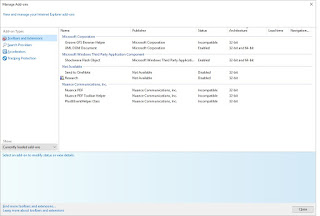
Now that I have upgraded to Windows-10, I will use IE-11 with the settings above. And while you should probably just skip websites that warrant it, "InPrivate Browsing" is there in Safety options if you need it. It's easy to switch your default browser away from Edge in Windows-10.

Using Edge is another option and might also be better for less technically-inclined or casual computer users. I'm trying to use it more myself. Looks like Enterprise Mode might be a way to ease the transition. Remember that there is also a "Open with Internet Explorer" menu-option in Edge (if you come across a legitimate website that is not working properly in Edge). Like it or not, the new Microsoft Edge browser is the future since Microsoft has ceased development on Internet Explorer (Edge is their new browser ... they had to start over). I still have Google Chrome installed as (rarely used) tertiary browser. Who has time for computer problems ... we have some flying to do.
More References:
http://www.eightforums.com/tutorials/31977-internet-explorer-enhanced-protected-mode-turn-off.html
http://stackoverflow.com/questions/19029208/how-does-internet-explorer-11-differ-between-windows-7-and-windows-8-1
... or just Google it :)
Windows-7: IE-11/Internet Options/Advanced tab/Security section/
Enable Enhanced Protected Mode
Close everything and reboot computer.
Windows-8.1: IE-11/Internet Options/Advanced tab/Security section/
Enable Enhanced Protected Mode
Enable 64-bit processes for Enhanced Protected Mode
Close everything and reboot computer.
Windows-10: IE-11/Internet Options/Advanced tab/Security section/
Enable Enhanced Protected Mode
Enable 64-bit processes for Enhanced Protected Mode
Close everything and reboot computer.

Here are my Add-Ons in Win-10/IE-11 after visiting a few websites and using Outlook.com and Word Online. Notice which are "32bit and 64bit Architecture" (allows them to be enabled in EPM), and which are actually Enabled. You can show "Currently loaded Add-ons" but there are others that load as needed (some without additional permission because they are from a trusted Publisher).

Now that I have upgraded to Windows-10, I will use IE-11 with the settings above. And while you should probably just skip websites that warrant it, "InPrivate Browsing" is there in Safety options if you need it. It's easy to switch your default browser away from Edge in Windows-10.

Using Edge is another option and might also be better for less technically-inclined or casual computer users. I'm trying to use it more myself. Looks like Enterprise Mode might be a way to ease the transition. Remember that there is also a "Open with Internet Explorer" menu-option in Edge (if you come across a legitimate website that is not working properly in Edge). Like it or not, the new Microsoft Edge browser is the future since Microsoft has ceased development on Internet Explorer (Edge is their new browser ... they had to start over). I still have Google Chrome installed as (rarely used) tertiary browser. Who has time for computer problems ... we have some flying to do.
More References:
http://www.eightforums.com/tutorials/31977-internet-explorer-enhanced-protected-mode-turn-off.html
http://stackoverflow.com/questions/19029208/how-does-internet-explorer-11-differ-between-windows-7-and-windows-8-1
... or just Google it :)
Tuesday, February 2, 2016
SSD upgrades. Why upgrade and my "best in value-class" pick
After my last post, I got to thinking about other simple computer upgrades that help provide additional performance and dependability to the computers we use in our hobby and daily lives. Solid-State-Drives (SSDs) definitely fall into that category.
SSDs provide various advantages over conventional Hard-Disk-Drives (HDD), with their mechanical spinning platters. For one, they have no moving parts so they are more durable, dependable, use less power, and run cooler. This is especially helpful for portable devices like we use daily in the shop or at the flying field.
The other main advantage is speed. They are often at least 200%-400% faster. A HDD-based computer upgraded to a SSD will be much faster than ever before (even when it was new). Not only is data-transfer speed faster, but the number of Input-Output Operations-Per-Second (IOPS) are off-the-scale better. Even an older computer (maybe with SATA-II/3-Gb interface) will boot much faster and seem notably snappier.
I tend to stick with the more popular SSDs brands/models with proven dependably, compatibility, and performance. If I had an unlimited budget (who does these days), I'm not sure what my suggested "best SSD" would be. However, my current, affordable, and best-bang-for-your-buck "value-class" pick is the Kingston SSD-Now v300 SSD. I have several of these installed in various computers, and they are all working fine.
Favorable Specs:
SATA-III/6-Gb Interface (also backwards compatible with SATA-II)
SandForce SF-2281 Controller
MLC memory-type
Bench-marked at around 450MB/s (read and write in ATTO)
To hold your bootable Windows and main programs, most computers can get-by with a 120gb drive (you can store large data/video files on a separate drive or in the cloud). If you are a power-user and want a bit more "breathing room", a 240gb drive is better (but not required).
And for you Apple users out there, this same SSD ends up being very similar to OWC's drive, so it works nice for Mac upgrades also (seems to side-step OSx trim-support compatibility issues).
You can install Windows operating-system, drivers, and programs fresh (aka "clean-install). You sometimes have the option to move your existing bootable C: drive by "cloning it" using Partition Backup & Imaging Tools. Windows-10 has free bundled Imaging tools now. I previously successfully used the third-party utility-program Acronis-2010 (before UEFI & SecureBoot) but lately I've been liking Macrium Reflect (free) .
SSDs provide various advantages over conventional Hard-Disk-Drives (HDD), with their mechanical spinning platters. For one, they have no moving parts so they are more durable, dependable, use less power, and run cooler. This is especially helpful for portable devices like we use daily in the shop or at the flying field.
The other main advantage is speed. They are often at least 200%-400% faster. A HDD-based computer upgraded to a SSD will be much faster than ever before (even when it was new). Not only is data-transfer speed faster, but the number of Input-Output Operations-Per-Second (IOPS) are off-the-scale better. Even an older computer (maybe with SATA-II/3-Gb interface) will boot much faster and seem notably snappier.
I tend to stick with the more popular SSDs brands/models with proven dependably, compatibility, and performance. If I had an unlimited budget (who does these days), I'm not sure what my suggested "best SSD" would be. However, my current, affordable, and best-bang-for-your-buck "value-class" pick is the Kingston SSD-Now v300 SSD. I have several of these installed in various computers, and they are all working fine.
Favorable Specs:
SATA-III/6-Gb Interface (also backwards compatible with SATA-II)
SandForce SF-2281 Controller
MLC memory-type
Bench-marked at around 450MB/s (read and write in ATTO)
To hold your bootable Windows and main programs, most computers can get-by with a 120gb drive (you can store large data/video files on a separate drive or in the cloud). If you are a power-user and want a bit more "breathing room", a 240gb drive is better (but not required).
And for you Apple users out there, this same SSD ends up being very similar to OWC's drive, so it works nice for Mac upgrades also (seems to side-step OSx trim-support compatibility issues).
You can install Windows operating-system, drivers, and programs fresh (aka "clean-install). You sometimes have the option to move your existing bootable C: drive by "cloning it" using Partition Backup & Imaging Tools. Windows-10 has free bundled Imaging tools now. I previously successfully used the third-party utility-program Acronis-2010 (before UEFI & SecureBoot) but lately I've been liking Macrium Reflect (free) .
Saturday, January 9, 2016
Windows 10 - Upgrades and version 1511,10586" (aka "Threshold-2")
Since many of us use Windows in our hobby, I thought these notes might be helpful to someone. These tips should work on various computers.
HP21-2010 All-in-One Touch (HP AMD-based quad-core with Radeon-R3 graphics)
- ESC on boot for Post-Menu (BIOS and UEFI Diags)
This is not my main computer but I do use it. While I usually prefer "clean-installs" there is something to be said for easier overlay-installs (if they work). With broadband and more of a cloud focus, I am becoming more trusting of it. However, research of my problem lead to cause being that it was initially upgraded by overlay (aka in-place upgrade) from Windows 8.1.
(8-2014) Came with Windows 8.1. Using Microsoft Account login and Outlook.com email and cloud.
(9-2015) I verified with HP that this model was eligible, so I answered Microsoft's offer and online upgraded (by overlay) to Win-10 from WindowsUpdate soon after its release. No data or pre-installed apps were lost and this computer has been working fine since.
I also installed HP Support Assistant . It's a nice updater for HP drivers and Apps. (It updates itself from it's own separate "About" prompt.)
(1-2016) Threshold-2 Upgrade
Computer has been working fine.
WindowsUpdate tried to "Upgrade to Windows 10 Home. version 1511,10586" (aka "Threshold-2") but Failed Auto-Install several times (as revealed in logs).
Hard-drive Error-check reveals no problems.
For all these procedures, start CommandPrompt as Admin and stay connected to Internet.
Start Version CommandPrompt> ver = 10.0.10240
CommandPrompt> SFC /scannow
- Says it found UN-REPAIRABLE errors
I think options at this point are to try Deployment Image Servicing and Management tool (DISM) or re-install (Overlay or Clean) from full Win10 .ISO (on flash drive)
CommandPrompt> dism.exe /online /cleanup-image /restorehealth
- Says it found UN-REPAIRABLE errors
- HOWEVER, I left PC for a while. Upon return I found that the Auto-Upgrade had started itself again and appeared to be working.
- Win10 (Threshold-2, 1511, 10586) install took about 2 hours (over WiFi) but worked fine. No apps or data-files were erased.
Now Version CommandPrompt says> ver = 10.0.10586
CommandPrompt> SFC /scannow
- SFC PASSES NOW
HP Support Assistant - Installed suggested driver updates - Now Current
WindowsUpdate - Installed suggested software updates - Now Current
- WindowsUpdate History resets and starts-over now (after Threshold-2 update was installed)
Computer working fine with latest version of Windows 10 Home (64bit).
Dell Venue Pro 8345 Tablet (Intel Atom and 32gb SSD ... initially shipped with Windows-8)
- Hold Power & Down-Volume from Power-On to access BIOS.
This machine was also suffering from multiple failed long auto-update (on it's own) Windows-10 upgrade attempts.
The main problems preventing the upgrade were:
1. Lack of "work space" on small SSD/flash memory (about 4gb) . This was compounded by the fact that Dell Backup and Restore (DBaR) was using a good portion (10 gb) of the available space for a Windows-8 Recovery Partition.
2. I installed the recommended (for Win-10 support) BIOS upgrade before attempting it again.
3. Current Win-8 WiFi driver seemed to be having a problem staying connected long enough for the large download installer download. Updated to latest version.
Then, I installed a SD-card in tablet and let Windows use that for Windows-10 Undo Files (these can be deleted later). The upgrade to Windows-10 finally completed successfully.
Dell Backup and Restore (DBaR) can then be uninstalled. It's not supported under Windows-10 anyway ( you now use Microsoft bundled backup tools). After reboot, if DBar's (old Win-8) recovery partition is still there, you can manually remove it. New free space on C: is 14gb.
Nice tablet. Might be a good way to run full Windows MissionPlanner in the field.
HP21-2010 All-in-One Touch (HP AMD-based quad-core with Radeon-R3 graphics)
- ESC on boot for Post-Menu (BIOS and UEFI Diags)
This is not my main computer but I do use it. While I usually prefer "clean-installs" there is something to be said for easier overlay-installs (if they work). With broadband and more of a cloud focus, I am becoming more trusting of it. However, research of my problem lead to cause being that it was initially upgraded by overlay (aka in-place upgrade) from Windows 8.1.
(8-2014) Came with Windows 8.1. Using Microsoft Account login and Outlook.com email and cloud.
(9-2015) I verified with HP that this model was eligible, so I answered Microsoft's offer and online upgraded (by overlay) to Win-10 from WindowsUpdate soon after its release. No data or pre-installed apps were lost and this computer has been working fine since.
I also installed HP Support Assistant . It's a nice updater for HP drivers and Apps. (It updates itself from it's own separate "About" prompt.)
(1-2016) Threshold-2 Upgrade
Computer has been working fine.
WindowsUpdate tried to "Upgrade to Windows 10 Home. version 1511,10586" (aka "Threshold-2") but Failed Auto-Install several times (as revealed in logs).
Hard-drive Error-check reveals no problems.
For all these procedures, start CommandPrompt as Admin and stay connected to Internet.
Start Version CommandPrompt> ver = 10.0.10240
CommandPrompt> SFC /scannow
- Says it found UN-REPAIRABLE errors
I think options at this point are to try Deployment Image Servicing and Management tool (DISM) or re-install (Overlay or Clean) from full Win10 .ISO (on flash drive)
CommandPrompt> dism.exe /online /cleanup-image /restorehealth
- Says it found UN-REPAIRABLE errors
- HOWEVER, I left PC for a while. Upon return I found that the Auto-Upgrade had started itself again and appeared to be working.
- Win10 (Threshold-2, 1511, 10586) install took about 2 hours (over WiFi) but worked fine. No apps or data-files were erased.
Now Version CommandPrompt says> ver = 10.0.10586
CommandPrompt> SFC /scannow
- SFC PASSES NOW
HP Support Assistant - Installed suggested driver updates - Now Current
WindowsUpdate - Installed suggested software updates - Now Current
- WindowsUpdate History resets and starts-over now (after Threshold-2 update was installed)
Computer working fine with latest version of Windows 10 Home (64bit).
Dell Venue Pro 8345 Tablet (Intel Atom and 32gb SSD ... initially shipped with Windows-8)
- Hold Power & Down-Volume from Power-On to access BIOS.
This machine was also suffering from multiple failed long auto-update (on it's own) Windows-10 upgrade attempts.
The main problems preventing the upgrade were:
1. Lack of "work space" on small SSD/flash memory (about 4gb) . This was compounded by the fact that Dell Backup and Restore (DBaR) was using a good portion (10 gb) of the available space for a Windows-8 Recovery Partition.
2. I installed the recommended (for Win-10 support) BIOS upgrade before attempting it again.
3. Current Win-8 WiFi driver seemed to be having a problem staying connected long enough for the large download installer download. Updated to latest version.
Then, I installed a SD-card in tablet and let Windows use that for Windows-10 Undo Files (these can be deleted later). The upgrade to Windows-10 finally completed successfully.
Dell Backup and Restore (DBaR) can then be uninstalled. It's not supported under Windows-10 anyway ( you now use Microsoft bundled backup tools). After reboot, if DBar's (old Win-8) recovery partition is still there, you can manually remove it. New free space on C: is 14gb.
Nice tablet. Might be a good way to run full Windows MissionPlanner in the field.
Subscribe to:
Posts (Atom)